In the earlier guide, Build a Production-Ready AI Agent in Python, Part 8 sketched a knowledge-base compiler agent.
This post builds that project completely.
No missing pieces. No "now wire it up yourself." No framework magic.
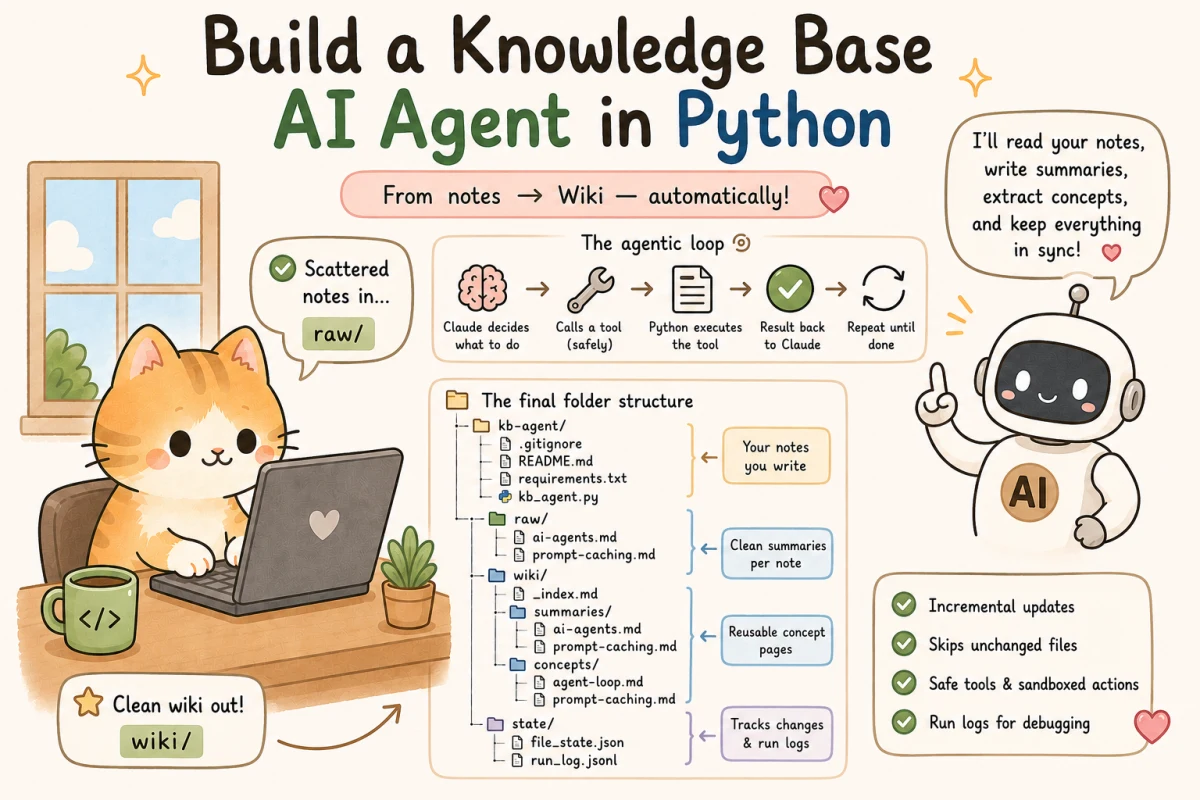
You will build a local Python agent that reads raw notes from a folder, asks Claude what to do next, lets Claude call safe file tools, writes summaries, creates concept pages, and maintains a root index for the knowledge base.
A local knowledge-base agent with this flow:
- Put raw notes in
raw/. - Run one Python script.
- Claude inspects the notes through tools.
- The agent writes clean summaries into
wiki/summaries/. - The agent creates reusable concept pages in
wiki/concepts/. - The agent updates
wiki/_index.md. - The script logs cost signals, step count, tool calls, and changed files.
The Roadmap
The project has six stages. Keep this map in mind while you build.
| Stage | What you do | What the agent does | Why it matters |
|---|---|---|---|
| 1 | Create folders and sample notes | Nothing yet | Gives the agent a safe workspace. |
| 2 | Set the API key | Authenticates requests | Keeps secrets out of code. |
| 3 | Paste the Python script | Defines tools, loop, state, and logs | Turns Claude from a chat model into an agent. |
| 4 | Run --force once |
Reads notes and writes the first wiki | Proves the full flow works. |
| 5 | Run again without changes | Skips unchanged files | Shows why file state exists. |
| 6 | Edit one note and rerun | Updates only affected pages | Shows incremental rebuilds. |
What This Agent Does
This agent is useful when you have scattered notes and want a clean local knowledge base.
Examples:
- lecture notes,
- meeting notes,
- research notes,
- product discovery notes,
- documentation drafts,
- customer interview notes,
- personal learning notes.
The agent does not use a vector database, a web app, or a framework. That is intentional. Beginners should first understand the loop.
The core loop is:
User task
-> Claude decides whether it needs a tool
-> Python executes the tool safely
-> Python returns the tool result
-> Claude continues
-> repeat until final answer
That is the agentic flow.
The Final Folder Structure
Create a project folder named kb-agent.
By the end, it will look like this:
kb-agent/
  .gitignore
  README.md
  requirements.txt
  kb_agent.py
  raw/
    ai-agents.md
    prompt-caching.md
  wiki/
    _index.md
    summaries/
      ai-agents.md
      prompt-caching.md
    concepts/
      agent-loop.md
      prompt-caching.md
  state/
    file_state.json
    run_log.jsonl
Here is what each part means:
| Path | Purpose |
|---|---|
kb_agent.py |
The complete Python agent. |
requirements.txt |
Python dependencies. |
.gitignore |
Prevents secrets and generated state from being committed. |
raw/ |
Your source notes. You write these manually. |
wiki/summaries/ |
One clean summary per source note. The agent writes these. |
wiki/concepts/ |
Reusable concept pages. The agent writes these. |
wiki/_index.md |
The main navigation page. The agent writes this. |
state/file_state.json |
Hashes of raw files so unchanged files can be skipped. |
state/run_log.jsonl |
Append-only run logs for debugging. |
There are three kinds of folders here:
raw/is human input.wiki/is agent output.state/is memory for rebuilds and debugging.
That separation is what keeps the project understandable.
Step 1: Create The Project
Open your terminal.
macOS or Linux:
mkdir kb-agent
cd kb-agent
mkdir -p raw wiki/summaries wiki/concepts state
Windows PowerShell:
mkdir kb-agent
cd kb-agent
New-Item -ItemType Directory -Force raw, wiki, wiki/summaries, wiki/concepts, state
Create a virtual environment.
macOS or Linux:
python3 -m venv .venv
source .venv/bin/activate
Windows PowerShell:
py -m venv .venv
.\.venv\Scripts\Activate.ps1
If activation works, your terminal prompt will usually show (.venv).
Step 2: Install The Anthropic Python SDK
Create requirements.txt:
anthropicInstall it:
pip install -r requirements.txtAnthropic provides an official Python SDK. The SDK handles request formatting, authentication headers, retries, error types, and response objects more cleanly than hand-written HTTP code.
Step 3: Get Your Anthropic API Key
You need an Anthropic Console account and an API key.
Do this once:
- Open
https://console.anthropic.com/. - Sign in or create an account.
- Add billing or credits if your account requires it.
- Go to API Keys.
- Click Create Key.
- Give it a clear name, such as
kb-agent-local. - Copy the key immediately.
Treat the key like a password.
Do not paste it into your code. Do not commit it to GitHub. Do not put it in a screenshot.
Set it as an environment variable.
macOS or Linux:
export ANTHROPIC_API_KEY="sk-ant-your-key-here"Windows PowerShell, current terminal only:
$env:ANTHROPIC_API_KEY="sk-ant-your-key-here"To check whether the variable is set, run:
macOS or Linux:
echo $ANTHROPIC_API_KEYWindows PowerShell:
echo $env:ANTHROPIC_API_KEYYou should see a key-like value. If you see nothing, the Python script will not be able to authenticate.
Never write the real API key inside kb_agent.py.
The code should read it from ANTHROPIC_API_KEY at runtime.
Step 4: Add .gitignore
Create .gitignore:
.venv/
__pycache__/
.env
state/
.DS_Store
Why ignore state/?
For this beginner project, state is local runtime data. You can commit it later if you want reproducible rebuild behavior, but while learning, it is cleaner to keep it local.
Step 5: Add Sample Raw Notes
Create raw/ai-agents.md:
# AI Agents

An AI agent is a language model inside a loop. The loop lets the model decide, act through tools, observe the result, and decide again.

The three basic parts are:

- model: decides what to do next
- tools: actions the model can request
- orchestrator: code that runs the loop and manages state

A safe agent should have a maximum step count. Without a step limit, a broken tool can cause repeated retries and high cost.
Create raw/prompt-caching.md:
# Prompt Caching

Prompt caching reduces repeated prompt processing cost when the same prompt prefix is reused.

It is useful when a system prompt, tool list, or large context block stays mostly stable across requests.

Caching does not remove the need to track token usage. A production agent should still log input tokens, output tokens, cache reads, and cache writes when available.
These files are intentionally small. Start small. Once the agent works, add your real notes.
Step 6: Create The Agent Script
Create kb_agent.py.
This is the complete script:
import argparse
import hashlib
import json
import logging
import os
import time
from pathlib import Path
from typing import Any

import anthropic


ROOT = Path(__file__).resolve().parent
RAW_DIR = ROOT / "raw"
WIKI_DIR = ROOT / "wiki"
SUMMARY_DIR = WIKI_DIR / "summaries"
CONCEPT_DIR = WIKI_DIR / "concepts"
STATE_DIR = ROOT / "state"
FILE_STATE_PATH = STATE_DIR / "file_state.json"
RUN_LOG_PATH = STATE_DIR / "run_log.jsonl"

MODEL = os.getenv("ANTHROPIC_MODEL", "claude-sonnet-4-6")
MAX_STEPS = int(os.getenv("KB_AGENT_MAX_STEPS", "30"))
MAX_FILE_CHARS = int(os.getenv("KB_AGENT_MAX_FILE_CHARS", "30000"))


SYSTEM_PROMPT = """
You are a careful knowledge-base compiler agent.

Your job is to turn raw notes into a clear local wiki.

Project folders:
- raw/ contains source notes written by the user.
- wiki/summaries/ should contain one summary per raw file.
- wiki/concepts/ should contain reusable concept pages.
- wiki/_index.md should be the navigation page.

Workflow:
1) Inspect raw/.
2) Read the changed raw files listed in the user task.
3) Read existing wiki files when useful.
4) Write or update one summary file per changed raw file.
5) Create or update concept pages for repeated or important ideas.
6) Update wiki/_index.md so a reader can navigate the knowledge base.
7) End with a concise report of files created or updated.

Writing rules:
- Use plain English.
- Preserve source meaning.
- Do not invent facts that are not in the raw notes.
- If a raw note is unclear, say what is unclear in the summary.
- Every summary should include a "Source" line pointing to the raw file.
- Concept pages should explain one concept at a time.
- Keep headings clean and consistent.

Safety rules:
- Only use the provided tools.
- Do not ask for hidden files, environment variables, or secrets.
- Do not write outside wiki/.
- Do not modify raw/.
""".strip()


TOOLS = [
    {
        "name": "list_files",
        "description": "List readable files under a project directory such as raw, wiki, wiki/summaries, or wiki/concepts.",
        "input_schema": {
            "type": "object",
            "properties": {
                "directory": {
                    "type": "string",
                    "description": "A relative directory path, for example raw or wiki/summaries."
                }
            },
            "required": ["directory"]
        }
    },
    {
        "name": "read_file",
        "description": "Read a UTF-8 text file from raw or wiki.",
        "input_schema": {
            "type": "object",
            "properties": {
                "path": {
                    "type": "string",
                    "description": "A relative file path, for example raw/ai-agents.md or wiki/_index.md."
                }
            },
            "required": ["path"]
        }
    },
    {
        "name": "write_file",
        "description": "Write a UTF-8 markdown file under wiki. This tool cannot write to raw.",
        "input_schema": {
            "type": "object",
            "properties": {
                "path": {
                    "type": "string",
                    "description": "A relative wiki path, for example wiki/summaries/ai-agents.md."
                },
                "content": {
                    "type": "string",
                    "description": "The complete markdown content to write."
                }
            },
            "required": ["path", "content"]
        }
    }
]


logging.basicConfig(
    level=logging.INFO,
    format="%(asctime)s | %(levelname)s | %(message)s",
)
logger = logging.getLogger("kb-agent")


def ensure_project_dirs() -> None:
    for directory in [RAW_DIR, SUMMARY_DIR, CONCEPT_DIR, STATE_DIR]:
        directory.mkdir(parents=True, exist_ok=True)


def require_api_key() -> None:
    if not os.getenv("ANTHROPIC_API_KEY"):
        raise RuntimeError(
            "ANTHROPIC_API_KEY is not set. Export it before running the agent."
        )


def to_safe_path(relative_path: str, allowed_roots: list[Path]) -> Path:
    if not relative_path or relative_path.startswith("/"):
        raise ValueError("Use a non-empty relative path.")

    candidate = (ROOT / relative_path).resolve()

    for allowed_root in allowed_roots:
        allowed = allowed_root.resolve()
        # Allow the root itself, such as raw/, and any child inside it.
        if candidate == allowed or allowed in candidate.parents:
            return candidate

    allowed_names = ", ".join(str(path.relative_to(ROOT)) for path in allowed_roots)
    raise ValueError(f"Path is outside allowed roots: {allowed_names}")


def file_sha256(path: Path) -> str:
    digest = hashlib.sha256()
    with path.open("rb") as file:
        for chunk in iter(lambda: file.read(1024 * 1024), b""):
            digest.update(chunk)
    return digest.hexdigest()


def load_file_state() -> dict[str, str]:
    if not FILE_STATE_PATH.exists():
        return {}
    return json.loads(FILE_STATE_PATH.read_text(encoding="utf-8"))


def save_file_state(state: dict[str, str]) -> None:
    FILE_STATE_PATH.parent.mkdir(parents=True, exist_ok=True)
    FILE_STATE_PATH.write_text(json.dumps(state, indent=2, sort_keys=True), encoding="utf-8")


def discover_raw_files() -> list[Path]:
    return sorted(
        path for path in RAW_DIR.rglob("*")
        if path.is_file() and path.suffix.lower() in {".md", ".txt"}
    )


def changed_raw_files(force: bool = False) -> tuple[list[str], dict[str, str]]:
    old_state = load_file_state()
    new_state: dict[str, str] = {}
    changed: list[str] = []

    for path in discover_raw_files():
        relative = path.relative_to(ROOT).as_posix()
        current_hash = file_sha256(path)
        new_state[relative] = current_hash
        if force or old_state.get(relative) != current_hash:
            changed.append(relative)

    return changed, new_state


def append_run_log(event: dict[str, Any]) -> None:
    STATE_DIR.mkdir(parents=True, exist_ok=True)
    with RUN_LOG_PATH.open("a", encoding="utf-8") as file:
        file.write(json.dumps(event, sort_keys=True) + "\n")


def tool_list_files(tool_input: dict[str, Any]) -> str:
    directory = tool_input["directory"]
    base = to_safe_path(directory, [RAW_DIR, WIKI_DIR])

    if not base.exists():
        return json.dumps({"files": [], "note": f"Directory does not exist: {directory}"})

    files = []
    for path in sorted(base.rglob("*")):
        if path.is_file() and path.suffix.lower() in {".md", ".txt"}:
            files.append(path.relative_to(ROOT).as_posix())

    return json.dumps({"files": files}, indent=2)


def tool_read_file(tool_input: dict[str, Any]) -> str:
    relative_path = tool_input["path"]
    path = to_safe_path(relative_path, [RAW_DIR, WIKI_DIR])

    if not path.exists() or not path.is_file():
        raise FileNotFoundError(relative_path)

    text = path.read_text(encoding="utf-8")
    if len(text) > MAX_FILE_CHARS:
        return text[:MAX_FILE_CHARS] + "\n\n[TRUNCATED: file exceeded MAX_FILE_CHARS]"
    return text


def tool_write_file(tool_input: dict[str, Any]) -> str:
    relative_path = tool_input["path"]
    content = tool_input["content"]
    path = to_safe_path(relative_path, [WIKI_DIR])

    if path.suffix.lower() != ".md":
        raise ValueError("Only markdown files can be written.")

    path.parent.mkdir(parents=True, exist_ok=True)
    path.write_text(content.rstrip() + "\n", encoding="utf-8")

    return json.dumps({
        "written": path.relative_to(ROOT).as_posix(),
        "characters": len(content),
    })


TOOL_REGISTRY = {
    "list_files": tool_list_files,
    "read_file": tool_read_file,
    "write_file": tool_write_file,
}


def execute_tool_safely(tool_name: str, tool_input: dict[str, Any]) -> str:
    try:
        if tool_name not in TOOL_REGISTRY:
            return f"ToolError: Unknown tool: {tool_name}"
        return TOOL_REGISTRY[tool_name](tool_input)
    except Exception as error:
        return f"ToolError: {type(error).__name__}: {error}"


def call_claude_with_retry(client: anthropic.Anthropic, **kwargs: Any):
    max_retries = 4
    base_wait = 1
    last_error: Exception | None = None

    for attempt in range(1, max_retries + 1):
        try:
            return client.messages.create(**kwargs)
        except anthropic.RateLimitError as error:
            last_error = error
        except anthropic.APIConnectionError as error:
            last_error = error
        except anthropic.APIStatusError as error:
            if error.status_code not in {429, 500, 502, 503, 529}:
                raise
            last_error = error

        wait = min(base_wait * (2 ** (attempt - 1)), 30)
        logger.warning("Retrying Claude call in %ss after attempt %s", wait, attempt)
        time.sleep(wait)

    assert last_error is not None
    raise last_error


def text_from_response(response: Any) -> str:
    parts: list[str] = []
    for block in response.content:
        if getattr(block, "type", None) == "text":
            parts.append(block.text)
    return "\n".join(parts).strip()


def build_task(changed_files: list[str], force: bool) -> str:
    mode = "full rebuild" if force else "incremental rebuild"
    changed_list = "\n".join(f"- {path}" for path in changed_files)

    return f"""
Run a {mode} of the local knowledge base.

Changed raw files:
{changed_list}

Required outputs:
1) Update wiki/summaries/ for every changed raw file.
2) Update wiki/concepts/ for concepts that are new or affected by changed notes.
3) Update wiki/_index.md with a clean navigation structure.
4) Finish with a short report listing files created or updated.

Important:
- Use list_files before assuming what exists.
- Read raw files before writing summaries.
- Read existing wiki files before overwriting them when relevant.
- Do not modify raw files.
""".strip()


def run_agent(task: str) -> str:
    client = anthropic.Anthropic()
    messages: list[dict[str, Any]] = [{"role": "user", "content": task}]

    total_input_tokens = 0
    total_output_tokens = 0

    for step in range(1, MAX_STEPS + 1):
        logger.info("Agent step %s/%s", step, MAX_STEPS)

        response = call_claude_with_retry(
            client,
            model=MODEL,
            max_tokens=4096,
            system=SYSTEM_PROMPT,
            tools=TOOLS,
            messages=messages,
        )

        usage = getattr(response, "usage", None)
        if usage:
            total_input_tokens += getattr(usage, "input_tokens", 0) or 0
            total_output_tokens += getattr(usage, "output_tokens", 0) or 0

        append_run_log({
            "step": step,
            "stop_reason": response.stop_reason,
            "input_tokens": getattr(usage, "input_tokens", None) if usage else None,
            "output_tokens": getattr(usage, "output_tokens", None) if usage else None,
        })

        if response.stop_reason == "end_turn":
            final_text = text_from_response(response)
            logger.info("Agent finished. input_tokens=%s output_tokens=%s", total_input_tokens, total_output_tokens)
            return final_text

        if response.stop_reason != "tool_use":
            raise RuntimeError(f"Unhandled stop_reason: {response.stop_reason}")

        messages.append({"role": "assistant", "content": response.content})

        tool_results = []
        for block in response.content:
            if getattr(block, "type", None) != "tool_use":
                continue

            logger.info("Executing tool: %s", block.name)
            output = execute_tool_safely(block.name, block.input)

            append_run_log({
                "step": step,
                "tool": block.name,
                "tool_input": block.input,
                "tool_output_preview": output[:500],
            })

            tool_results.append({
                "type": "tool_result",
                "tool_use_id": block.id,
                "content": output,
            })

        if not tool_results:
            raise RuntimeError("Claude returned tool_use stop_reason but no tool_use blocks.")

        messages.append({"role": "user", "content": tool_results})

    raise RuntimeError(f"Agent stopped after MAX_STEPS={MAX_STEPS}")


def main() -> None:
    parser = argparse.ArgumentParser(description="Build a local markdown knowledge base with Claude tool use.")
    parser.add_argument("--force", action="store_true", help="Rebuild from all raw files, even if unchanged.")
    args = parser.parse_args()

    ensure_project_dirs()
    require_api_key()

    changed_files, new_state = changed_raw_files(force=args.force)

    if not changed_files:
        print("No raw files changed. Use --force to rebuild anyway.")
        return

    logger.info("Changed raw files: %s", ", ".join(changed_files))

    task = build_task(changed_files, force=args.force)
    final_report = run_agent(task)

    save_file_state(new_state)

    print("\n=== Agent Report ===")
    print(final_report)
    print("\n=== Output Folder ===")
    print(WIKI_DIR.relative_to(ROOT).as_posix())


if __name__ == "__main__":
    main()
That is the complete agent.
Before running it, read the next section so the code feels less mysterious.
Step 7: Understand The Code Before Running It
There are six important pieces.
1. The System Prompt
SYSTEM_PROMPT tells Claude the job, folder rules, writing style, and safety boundaries.
This matters because the model should not guess your project structure. It should know exactly where source files live and where generated files belong.
2. The Tool Definitions
TOOLS describes three tools:
| Tool | Purpose |
|---|---|
list_files |
Lets Claude inspect folder contents. |
read_file |
Lets Claude read raw notes and existing wiki files. |
write_file |
Lets Claude write markdown under wiki/. |
Claude does not execute these tools directly.
Claude asks for a tool. Your Python code executes it.
That distinction is everything.
3. Safe Paths
to_safe_path() prevents path traversal.
This means the agent cannot write to arbitrary places like:
../../Desktop/secrets.txtThe write tool only allows writes under wiki/. The read tool only allows reads under raw/ and wiki/.
The candidate == allowed check is there for folder roots like raw/ itself. The allowed in candidate.parents check is there for files inside the folder, such as raw/ai-agents.md. You need both checks because listing a folder root and reading a file inside that folder are different path cases.
4. Incremental Rebuilds
changed_raw_files() computes a SHA-256 hash for each raw file.
The hash is a fingerprint of file content. If even one character changes, the fingerprint changes.
Why not just check the file's modified time? Because timestamps can change when a file is touched, copied, or restored, even if the content is identical. A content hash answers the question the agent actually cares about: did the note's text change?
If the content did not change, the file is skipped on normal runs. If you want to rebuild everything anyway, use:
python kb_agent.py --force5. File Size Limits
MAX_FILE_CHARS prevents one huge note from flooding the model context.
Current Sonnet 4.6 documentation lists a 1M-token context window, so this limit is not here because the model can only handle tiny files. It is here because one oversized note can dominate a multi-step run, push out other useful context, and make every retry more expensive.
If a file is too large, read_file returns the first part and adds:
[TRUNCATED: file exceeded MAX_FILE_CHARS]That warning is useful, but it is not magic. Claude can only summarize the text it actually received. If a critical note is truncated, split the note into smaller files or raise KB_AGENT_MAX_FILE_CHARS deliberately.
6. The Agent Loop
run_agent() is the loop.
It sends the task to Claude, waits for either:
end_turn, meaning Claude is done, ortool_use, meaning Claude wants your code to run a tool.
When Claude requests a tool, the script executes it and sends a matching tool_result back.
This is the core agentic pattern.
Step 8: Run The Agent
Make sure your virtual environment is active and your API key is set.
Then run:
python kb_agent.py --forceYou should see logs like this:
2026-05-20 18:20:10 | INFO | Changed raw files: raw/ai-agents.md, raw/prompt-caching.md
2026-05-20 18:20:11 | INFO | Agent step 1/30
2026-05-20 18:20:14 | INFO | Executing tool: list_files
2026-05-20 18:20:15 | INFO | Agent step 2/30
2026-05-20 18:20:18 | INFO | Executing tool: read_file
2026-05-20 18:20:20 | INFO | Executing tool: write_file
The exact tool order may differ. That is fine.
When it finishes, inspect:
macOS or Linux:
ls -R wikiWindows PowerShell:
Get-ChildItem -Recurse wikiYou should see something like:
wiki/
  _index.md
  concepts/
    agent-loop.md
    prompt-caching.md
  summaries/
    ai-agents.md
    prompt-caching.md
Open wiki/_index.md.
It should contain navigation links to summaries and concepts.
Step 9: Run It Again
Run:
python kb_agent.pyIf you did not edit anything in raw/, you should see:
No raw files changed. Use --force to rebuild anyway.That means incremental rebuilds are working.
The first run proves the agent can build the wiki.
The second run proves the agent has state.
Without state/file_state.json, the script would rebuild everything every time. That is okay for two notes, but painful for a real folder.
Now edit raw/ai-agents.md and add this paragraph:
Agents should keep logs for debugging. A run log should include step count, stop reason, tool name, and token usage.Run again:
python kb_agent.pyThis time the agent should process only the changed file and update the related wiki pages.
What The Generated Wiki Should Look Like
A summary file might look like this:
# AI Agents

Source: `raw/ai-agents.md`

## Summary

An AI agent is a language model inside a loop. The loop lets the model decide, call tools, observe results, and continue until a stopping condition is reached.

## Key Points

- The model decides what to do next.
- Tools are actions the model can request.
- The orchestrator manages the loop and state.
- A maximum step count prevents runaway behavior.

## Related Concepts

- [Agent Loop](../concepts/agent-loop.md)
A concept page might look like this:
# Agent Loop

An agent loop is the repeated cycle that lets a language model act through tools.

The usual sequence is:

1. Read the task and context.
2. Decide the next action.
3. Request a tool call if needed.
4. Receive the tool result.
5. Continue or stop.

A safe loop needs a maximum step count, logging, and tool error handling.
Do not worry if your output is not identical. The point is the structure.
The Agentic Flow, Step By Step
Here is what happens during a run:
| Step | Actor | What happens |
|---|---|---|
| 1 | Python | Finds changed files in raw/. |
| 2 | Python | Sends Claude the task and tool definitions. |
| 3 | Claude | Decides it needs to inspect folders or files. |
| 4 | Python | Executes list_files or read_file. |
| 5 | Python | Sends results back as tool_result. |
| 6 | Claude | Uses the results to plan wiki updates. |
| 7 | Python | Executes write_file for summaries, concepts, and index. |
| 8 | Claude | Returns a final report. |
| 9 | Python | Saves file hashes to state/file_state.json. |
Claude is the planner and writer.
Python is the executor and safety boundary.
Why The Write Tool Is Restricted
Notice this line in the code:
path = to_safe_path(relative_path, [WIKI_DIR])That means write_file can only write under wiki/.
This is not just a beginner detail. It is production thinking.
An agent should not have more authority than it needs. This agent needs to write generated wiki files. It does not need to overwrite source notes, shell scripts, environment files, or secrets.
Common Errors And Fixes
| Error | Likely cause | Fix |
|---|---|---|
ANTHROPIC_API_KEY is not set |
Environment variable missing | Export the key in the same terminal. |
ModuleNotFoundError: anthropic |
SDK not installed in active environment | Activate .venv, then run pip install -r requirements.txt. |
model not found |
Model unavailable on your account or changed in docs | Check Anthropic's model overview and set ANTHROPIC_MODEL to a listed Claude API ID. |
| Agent stops after max steps | Task too broad or tool loop got stuck | Increase KB_AGENT_MAX_STEPS or simplify raw files. |
Path is outside allowed roots |
Claude requested an unsafe path | Good. The safety boundary worked. |
| No files changed | File hashes match previous run | Use --force or edit a file in raw/. |
At the time of writing, Anthropic's model docs list claude-opus-4-7 as the strongest generally available model for complex tasks.
To change the model for one run:
macOS or Linux:
ANTHROPIC_MODEL="claude-opus-4-7" python kb_agent.py --forceWindows PowerShell:
$env:ANTHROPIC_MODEL="claude-opus-4-7"
python kb_agent.py --force
Use a stronger model for harder synthesis. Use a faster model for cheaper routine rebuilds.
Cost And Safety Controls
This beginner project has several controls:
For cost, the useful beginner rule is simple: expect cents, not dollars.
| Control | Why it matters |
|---|---|
MAX_STEPS |
Prevents runaway loops. |
MAX_FILE_CHARS |
Prevents huge files from flooding context. |
write_file limited to wiki/ |
Prevents accidental source or secret edits. |
| SHA-256 file state | Avoids reprocessing unchanged notes. |
| Retry only for transient errors | Avoids retrying bad requests forever. |
| Run log | Helps debug tool calls and token usage. |
With the two tiny sample notes, expect cents, not dollars. At the current Sonnet 4.6 list price in Anthropic's model docs, input tokens are priced at $3 per million tokens and output tokens at $15 per million tokens.
A rough estimate is:
cost = input_tokens * 0.000003 + output_tokens * 0.000015So if a small run logs 1,000 input tokens and 500 output tokens, the estimate is:
1000 * 0.000003 + 500 * 0.000015 = $0.0105That is about one cent. If a more chatty run logs 8,000 input tokens and 1,500 output tokens, the estimate is about $0.0465, or five cents.
Tool use also adds tokens for tool definitions, tool calls, and tool results. A larger folder, a stronger model, or many tool loops will cost more.
Use state/run_log.jsonl to inspect input and output token counts after a run.
For a serious production system, add approval before writes, tests for tool behavior, structured JSON outputs, and a better review UI.
But for learning the flow, this is enough.
Why This Is Better Than A Single Prompt
With two short notes, you could paste everything into Claude and ask for a wiki.
That works as a one-off.
It breaks down when the folder grows.
Imagine you have 50 notes.
If you use one giant prompt, you pay to send old notes again, you risk hitting the context window, and you have no reliable record of which source files changed. If one note is renamed, the model does not know which old wiki page is now stale. If the output is wrong, you have no tool log showing what the model read before it wrote.
The agent version solves a narrower problem:
- It reads files on demand instead of pasting everything every time.
- It stores hashes so unchanged files can be skipped.
- It writes to a controlled folder instead of returning one huge blob.
- It logs tool calls and token counts.
- It can be run again tomorrow with the same rules.
That is the difference between a prompt and a workflow.
What To Try Next This Week
If you just finished the tutorial, do not add seven features. Add two.
- Add a
--dry-runmode. In dry-run mode, let Claude propose file changes, but print them instead of writing them. This teaches you how to separate planning from execution. - Add tests for
to_safe_path()andchanged_raw_files(). These two functions protect the machine and control rebuild behavior. They are small enough to test, and important enough to deserve tests.
After that, choose from this backlog only when you feel the pain:
- Add
delete_filefor stale wiki pages, but require human confirmation. The safe version should ask Claude to propose deletions, print the exact paths, and only delete after you approve them. - Add
read_indexandwrite_indexas narrower tools instead of generic file writes. - Add front matter to every generated wiki page.
- Add prompt caching if your system prompt and tool definitions stay stable across many runs.
- Add a review step where the agent writes proposed changes to
wiki/_drafts/first.
The agent should grow only when you understand the failure mode each feature solves. Small, understood agents beat large mysterious ones.
The Mental Model To Keep
A beginner often thinks the model is the whole agent.
It is not.
The model is only the decision engine.
The full agent is:
model + tools + loop + state + safety boundaries + logsIf one of those pieces is missing, the agent may still demo well, but it will not be reliable.
Conclusion
You now have a complete local knowledge-base agent.
It can read raw notes, call tools, write summaries, create concept pages, update an index, skip unchanged files, and keep a log of what happened.
More importantly, you have seen the agentic flow end to end:
- Claude decides.
- Python executes.
- Tool results return to Claude.
- The loop continues until the work is done.
That loop is the foundation of practical AI agents.
Once you understand it, frameworks become easier to evaluate. You can tell whether a framework is helping you, or hiding the part you actually need to understand.
Continue Reading
These posts give the broader context around this implementation:
- Build a Production-Ready AI Agent in Python explains the core agent loop, tool calling model, memory, retries, and reliability patterns before this project applies them.
- RAG Is an Evidence System explains how retrieval-augmented generation turns source material into evidence-backed AI answers.
- AI Coding Agents Are Changing Software Engineering explains why agentic workflows move engineering work toward architecture, constraints, verification, and review.
- AI Slop, AI Agents, and the New Quality Bar explains why agent output needs quality gates before people trust it.