Markdown won the first era of agent output for good reasons.
It is simple. It is portable. It can hold headings, lists, tables, code blocks, links, and a small amount of visual hierarchy. It works in terminals, GitHub, docs, issues, pull requests, and chat windows. When AI agents were mostly writing explanations, plans, and short specs, Markdown was the right default.
But agents are no longer only writing short explanations.
They read entire repositories. They inspect pull requests. They compare design directions. They synthesize Slack threads, Linear tickets, logs, dashboards, screenshots, browser state, git history, PDFs, and local files. Then they often return a 200-line Markdown file and expect a human to read it carefully.
That is where the interface starts to break.
The problem is not Markdown itself. The problem is using a linear document for work that is spatial, comparative, visual, interactive, or meant to be shared with people who will not patiently read a wall of text.
The future of agent output is not plain text versus Markdown versus HTML.
The future is artifact-shaped communication: outputs that match the cognitive job the human is trying to do.
Use Markdown when the output is short, durable, editable, and version-controlled.
Use HTML when the output needs layout, diagrams, comparison, interaction, sharing, or visual review.
Use richer simulations when the task requires seeing behavior over time, not just reading about it.
This is why the recent enthusiasm for HTML artifacts is worth taking seriously. Not because HTML is magical. Not because every agent should turn every answer into a mini website. But because HTML is currently the most available bridge between text-only agents and the richer human-AI interfaces we actually need.
The Better Question
The common argument sounds like this:
Ask your AI to structure the answer as HTML, then open it in a browser.
That is useful advice. It works surprisingly well.
But the better question is not, “Should agents output HTML?”
The better question is:
What representation lets the human understand, judge, edit, and respond with the least unnecessary effort?
Sometimes the answer is one paragraph.
Sometimes it is Markdown.
Sometimes it is a table.
Sometimes it is an annotated diff.
Sometimes it is a diagram.
Sometimes it is a browser-native mini tool with sliders, filters, tabs, preview panes, copy buttons, and export buttons.
Sometimes, eventually, it may be an interactive generated world or simulation.
The medium should follow the task.
Why This Matters Cognitively
There is a deep reason visual artifacts feel different from long text.
Larkin and Simon’s classic paper, “Why a Diagram is Sometimes Worth Ten Thousand Words,” argued that two representations can contain the same information but differ in how easy they make the next inference. A text description and a diagram may be informationally equivalent, but they are not always computationally equivalent. A diagram can make relationships visible at a location instead of forcing the reader to reconstruct them sentence by sentence.
That is exactly the problem with many agent outputs.
A Markdown plan can describe a system architecture. An HTML artifact can show the architecture, the file map, the data flow, the risks, and the implementation sequence in separate visual regions. Same information, different cognitive cost.
Mayer’s cognitive theory of multimedia learning points in a similar direction. People learn by selecting relevant words and images, organizing them into verbal and pictorial models, and integrating those models with prior knowledge. Well-designed words and pictures can support learning better than words alone, but only when they reduce unnecessary processing rather than add decorative noise.
That last caveat matters.
Visual output is not automatically better. Bad visual design can make cognition worse. A beautiful artifact that hides the answer is worse than a plain bullet list that says the answer clearly.
The goal is not decoration.
The goal is computational kindness.
The Visual Brain Argument, Carefully Stated
One popular argument for visual AI output is that vision is a dominant channel for human cognition. The direction is right, but the claim should be stated carefully.
Neuroscience estimates vary depending on how “visual cortex” is defined. Van Essen’s review reports that visual cortex occupies a large fraction of primate cortex, around 50% in macaques and around 25% in humans. Other accounts use different definitions and arrive at different numbers. The exact percentage is less important than the broader point: vision is a major channel for human cognition, and the human brain is extremely good at extracting structure from space, motion, color, shape, and relative position.
That does not mean every answer should become a picture.
It means that when the information has structure, the output should expose the structure.
Text is excellent for sequence.
Vision is excellent for relation.
Interactivity is excellent for exploration.
Agents should use all three.
Why Markdown Became The Default
Markdown became the default output format for agents because it sits at a very useful midpoint.
It is more structured than plain text, but less heavy than HTML. It gives the model enough syntax to express hierarchy without needing to design a whole interface. It also maps naturally to developer workflows: README files, GitHub issues, pull requests, docs, changelogs, specs, and comments.
Markdown is still the right default for many tasks.
| Task | Why Markdown works |
|---|---|
| Short answer | Low overhead and easy to scan. |
| README update | Native to repositories and review tools. |
| Pull request description | Easy to diff and edit. |
| API notes | Code fences and lists are enough. |
| Durable documentation | Clean version control history. |
| Agent instructions | Easy for humans and agents to parse. |
Markdown is not obsolete.
It is overextended.
When agents produce long plans, code reviews, research reports, design explorations, product specs, and implementation maps, Markdown starts behaving like a terminal pretending to be a design surface.
That is where HTML becomes interesting.
Why HTML Works So Well As An Agent Artifact
HTML is not just a document format. It is the native format of the browser, which is already the most widely deployed interactive runtime in the world.
A single HTML file can contain:
- headings and text,
- responsive layout,
- tables,
- code snippets,
- diagrams,
- SVG illustrations,
- charts,
- forms,
- buttons,
- sliders,
- filters,
- tabs,
- keyboard navigation,
- copy-to-clipboard actions,
- local interactivity,
- and export controls.
That makes it unusually well suited for agent output.
The agent does not need a backend. It does not need a product team. It does not need a package install. It can create a self-contained browser artifact that helps the human think.
This is the practical reason HTML is having a moment in AI workflows.
It lets an agent move from “telling” to “showing.”
It lets the human move from “reading” to “inspecting.”
The Best Current Use Cases
HTML artifacts are not equally valuable everywhere. They shine when the user needs to compare, inspect, adjust, or share.
| Use case | Why HTML beats Markdown |
|---|---|
| Design exploration | Multiple variants can be placed side by side. |
| Code review | Diffs can be annotated with severity, file maps, and jump links. |
| Architecture explanation | Boxes, arrows, data flow, and file ownership become visible. |
| Research report | Sections, charts, summaries, and source clusters reduce reading friction. |
| Incident review | Timeline, logs, decision points, and action items can be grouped spatially. |
| Prompt tuning | Inputs and filled templates can update live. |
| Dataset curation | Rows can be tagged, filtered, approved, and exported. |
| Ticket triage | Cards can be moved across Now, Next, Later, and Cut. |
| Design token review | Colors, spacing, typography, and components can be rendered directly. |
| Algorithm exploration | Sliders can reveal how parameters affect behavior. |
The important pattern is this:
If the human needs to choose, compare, tune, navigate, teach, or share, HTML is probably worth considering.
If the human only needs to read or commit a small text change, Markdown is still better.
The Artifact Ladder
We can think of AI output formats as a ladder. The point is not to climb it every time. The point is to stop at the smallest level that makes the human decision easier.
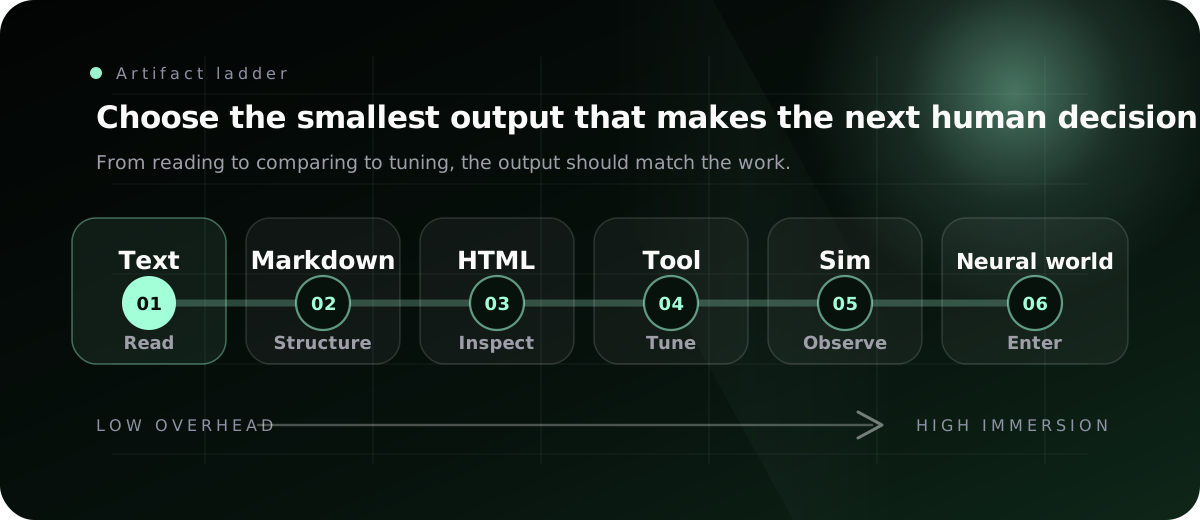
| Level | Format | Strength | Weakness |
|---|---|---|---|
| 1 | Plain text | Fast, universal, low overhead | Weak hierarchy and poor scanability |
| 2 | Markdown | Portable structure, code blocks, tables | Mostly linear and limited visually |
| 3 | HTML artifact | Layout, visuals, interactivity, sharing | Noisy diffs and more security surface |
| 4 | Browser-native mini app | State, controls, exports, local workflows | More engineering discipline required |
| 5 | Interactive simulation | Behavior over time, parameter exploration | Harder to verify and preserve |
| 6 | Neural world artifact | Generated, responsive environment | Still early, hard to control exactly |
HTML is not the final destination.
It is the current bridge.
It is procedural enough to inspect, copy, version, sandbox, and run in a browser. It is expressive enough to show layout, motion, diagrams, and interaction. That makes it a good middle layer between text documents and future generated simulations.
The Future Is Not Just HTML
The far end of the ladder is more speculative, but not science fiction anymore.
Research systems such as Genie explore generative interactive environments: models that can create action-controllable virtual worlds from video. GameNGen shows a diffusion model simulating a playable game environment in real time under specific conditions. These systems are not ready to replace software engineering, product design, or reliable simulation. They are also not the right tool for most developer workflows today.
But they point toward a direction.
Future AI outputs will not always be static documents. Some will be interactive worlds, simulations, prototypes, walkthroughs, or controllable videos. Instead of reading a report about a warehouse robot policy, you may inspect a generated simulation. Instead of reading a design spec, you may interact with the flow. Instead of reading a physics explanation, you may scrub the variables and watch the system respond.
The hard problem is not generating pixels.
The hard problem is combining neural generation with procedural reliability.
Software needs exactness. Simulations need constraints. Scientific and engineering tools need reproducibility. Generated media is flexible, but flexibility without correctness can be dangerous.
So the future is likely hybrid:
- procedural code for structure,
- neural generation for surfaces,
- deterministic checks for truth,
- human controls for correction,
- and exportable artifacts for continuity.
HTML already teaches this lesson. It is code, but it is also a medium.
Input Has The Same Problem
Audio may become one of the preferred inputs to AI in many situations. Speaking is faster and more natural than typing, especially when the user is thinking aloud, walking, cooking, driving, or sketching a vague idea.
But audio alone is not enough.
Humans do not communicate only in words. When two people sit at the same screen, they point, gesture, circle, scroll, pause, tap, draw boxes, highlight regions, and say things like “this part,” “move that there,” or “compare these two.”
This is not a new idea. Bolt, Schmandt, and Hulteen’s “Put That There” work explored voice plus gesture at a graphical interface decades ago. The system mattered because speech and pointing solved different parts of the interaction. Speech expressed intent. Gesture grounded the intent in space.
Modern AI interfaces are rediscovering the same lesson.
A serious agent interface needs more than a text box.
It needs:
- voice for fast intention,
- pointing for spatial reference,
- screen context for grounding,
- vision for what the user sees,
- editable artifacts for iteration,
- and export formats for continuity.
The “mind meld” between humans and AI does not require jumping straight to brain-computer interfaces. There is a lot of ordinary interface work left to do.
The Human-AI Design Principle
Amershi and colleagues’ guidelines for human-AI interaction are useful here because they keep the discussion grounded. Good AI interfaces should make clear what the system can do, show contextually relevant information, support correction, expose why the system did something, and give users control over time.
HTML artifacts can help with all of that.
A good artifact can show:
- what the agent inspected,
- what it inferred,
- what it is uncertain about,
- what alternatives it considered,
- what risks remain,
- what the human can change,
- and what should be copied back into the workflow.
That is a better interaction pattern than a long answer that hides uncertainty in prose.
The artifact makes the agent’s thinking inspectable.
It also makes the human’s feedback more precise.
The Best Pattern: Artifact With Export
The most important design pattern is not “make an HTML file.”
The most important pattern is:
Make an artifact that ends with an export.
A throwaway interface becomes useful when it can return structured output to the agent or the codebase.
Examples:
| Artifact | Export |
|---|---|
| Ticket triage board | Markdown ordering with rationale |
| Prompt tuner | Final prompt with selected parameters |
| Design token sheet | JSON token patch |
| Feature flag editor | Config diff |
| Dataset reviewer | Approved rows as CSV or JSONL |
| PR explainer | Review checklist and suggested comments |
| Architecture explorer | Implementation plan |
| Animation sandbox | Easing, duration, and state parameters |
This closes the loop.
The human does not merely admire the artifact. The human manipulates it, chooses, tunes, filters, annotates, and exports the result back into the agent workflow.
That is why HTML can feel more collaborative than Markdown.
It gives the human handles.
A Practical Prompt Pattern
When asking an agent for HTML, do not just say “make it HTML.” Tell the agent what job the artifact must do.
Poor prompt:
Explain this as HTML.Better prompt:
Create a single self-contained HTML artifact that helps me review this PR.
Show a file map, annotate the risky diffs, group findings by severity, and include a final checklist I can copy into the PR review.
Do not use external network resources.
Better still:
Create a single self-contained HTML artifact for choosing between three implementation approaches.
For each option, show architecture, affected files, migration risk, test strategy, and rollback plan.
Put the options side by side on desktop and stacked on mobile.
Add a copy button that exports my selected option as a Markdown implementation plan.
Do not fetch external scripts, fonts, or images.
The second prompt defines the medium.
The third prompt defines the workflow.
That is the difference.
The HTML Artifact Checklist
A useful HTML artifact should answer these questions:
| Question | Why it matters |
|---|---|
| What job does this artifact help the human do? | Prevents decorative output. |
| What should be visible first? | Controls cognitive load. |
| What can be compared side by side? | Uses spatial reasoning. |
| What should be interactive? | Adds agency only where useful. |
| What should be exportable? | Keeps the workflow connected. |
| What should be hidden until needed? | Avoids overwhelming the reader. |
| What must be self-contained? | Makes sharing and archiving easier. |
| What must not be included? | Protects secrets and reduces risk. |
If the artifact does not need layout, interaction, or export, maybe it should not be HTML.
Where HTML Is Worse
HTML has real downsides.
First, diffs are noisy. A Markdown document is easy to review in git. An HTML file full of CSS, SVG, and JavaScript can be painful to inspect.
Second, HTML can hide complexity. A polished page may look convincing even when the reasoning is weak. Design can create undeserved trust.
Third, generated HTML has a bigger security surface. JavaScript can run. External resources can be loaded. Data can be embedded accidentally. Sharing an HTML file is not the same as sharing a plain text file.
Fourth, HTML can take longer to generate and review. If the task is small, the artifact is overhead.
Fifth, HTML is often the wrong source of truth. A product spec, API contract, policy, or runbook may need to live as Markdown because it must be reviewed, versioned, diffed, and maintained.
So the right rule is not “HTML everywhere.”
The right rule is:
Use HTML for understanding and interaction. Use Markdown for durable source-of-truth text.
Sometimes that means both.
Ask the agent for an HTML artifact to explore the problem. Once the decision is made, ask it to export the final decision as Markdown, JSON, YAML, code, or a ticket update.
A Safe HTML Policy For Teams
If teams start using HTML artifacts seriously, they need a policy.
A simple one is enough:
## HTML Artifact Rules
- Use self-contained HTML unless the task explicitly requires external assets.
- Do not include secrets, tokens, private customer data, or proprietary datasets.
- Do not fetch external scripts from CDNs for internal artifacts.
- Keep JavaScript local and minimal.
- Add export buttons for any artifact that supports decisions or edits.
- If the output becomes a durable document, export the final version to Markdown or the repository's preferred source format.
- If the artifact is shared outside the team, review it like code.
This is especially important for coding agents because they can read local files. A report that accidentally embeds confidential snippets is not a harmless visualization. It is a leak with nice CSS.
Treat generated HTML as code.
When To Ask For HTML
Use HTML when you need one of these outcomes:
- compare alternatives,
- inspect a system map,
- understand a complicated flow,
- review a pull request,
- communicate status to leadership,
- explain a concept visually,
- prototype an interaction,
- tune parameters,
- curate structured data,
- build a temporary editor,
- create a shareable report,
- or keep a human in the loop during agent work.
Stay with Markdown when you need:
- a short answer,
- a commit message,
- a changelog entry,
- a README edit,
- a durable spec,
- a policy document,
- or a reviewable source file.
The difference is not taste.
It is job fit.
What This Means For Agent Builders
If you are building an AI product, do not treat output as one textarea.
Give the model multiple output surfaces.
At minimum:
- chat for quick back-and-forth,
- Markdown for durable text,
- HTML or canvas for artifacts,
- code files for implementation,
- diagrams for system structure,
- and export actions that move artifact state back into the workflow.
The best agent interfaces will not merely answer. They will generate the right workspace for the task.
For a research task, the workspace might be a visual evidence map.
For a code task, it might be an annotated diff and call graph.
For a design task, it might be six variants in a grid.
For a planning task, it might be a timeline with risks and file ownership.
For a configuration task, it might be a form-based editor with validation.
For a learning task, it might be an interactive explainer with glossary, diagrams, and live examples.
The model becomes more useful when its output stops pretending every answer is a document.
The Interface Progression
The progression looks something like this:
- Plain text: the model talks.
- Markdown: the model structures.
- HTML artifacts: the model lays out and demonstrates.
- Interactive tools: the model lets the human manipulate.
- Simulations: the model shows behavior over time.
- Neural worlds: the model generates environments the human can enter, steer, and interrogate.
We are early in level 3 and just beginning to glimpse level 5 and level 6.
That is enough.
You do not need to wait for neural interfaces, brain-computer implants, or fully generated worlds to improve the human-AI loop.
Ask for a better artifact today.
The Practical Recommendation
Do not become an HTML maximalist.
Become representation-aware.
The best current practice is simple:
- Ask for Markdown when the answer should be edited, reviewed, or committed as text.
- Ask for HTML when the answer should be inspected, compared, demonstrated, or shared.
- Ask for interactivity when the human needs to tune, filter, sort, annotate, or export.
- Ask for diagrams when relationships matter more than sequence.
- Ask for a final export when the artifact is part of a larger workflow.
Here is the prompt I would actually use:
Create a single self-contained HTML artifact for this task.
Optimize it for human review, not decoration.
Use layout, tables, diagrams, SVG, or small interactions only where they reduce cognitive load.
Include an export section that copies the final decision back as Markdown or JSON.
Do not use external scripts, remote fonts, or hidden network calls.
That prompt is better than “make it pretty.”
It tells the agent what the artifact is for.
Continue Reading
These pieces connect artifact design to broader agent practice:
- AI Slop, AI Agents, and the New Quality Bar explains why agent outputs need quality gates before they become published work.
- Stop Planning Everything. Start Writing Agent Skills. explains how reusable agent context keeps repeated workflows consistent.
- Build a Production-Ready AI Agent in Python shows the engineering loop behind agents that use tools and maintain state.
Conclusion
Markdown is not dead.
It is just no longer enough.
Agentic work is becoming too visual, too contextual, too comparative, and too interactive to fit everything into a linear text file. HTML works well today because it is the browser’s native artifact format: shareable, inspectable, visual, interactive, and still procedural enough to remain understandable.
The bigger point is not HTML itself.
The bigger point is that AI output should match human cognition.
Text is good for statements.
Markdown is good for structured documents.
HTML is good for artifacts.
Interactive simulations are good for behavior.
Future neural worlds may be good for immersion.
The interface should choose the smallest medium that makes the next human decision easier.
That is the real lesson.
The future of AI output is not longer answers.
It is better artifacts.